![bmk logo dark@2x.png]](https://info.biomemakers.com/hs-fs/hubfs/Web%20Images/Logos/bmk%20logo%20dark@2x.png?height=30&name=bmk%20logo%20dark@2x.png)
This tool is ideal for:
- Comparing treated vs. untreated plots
- Monitoring how a product affects microbial abundance (e.g., Trichoderma)
- Tracking changes across parcels or timepoints
- Quickly seeing differences between groups using min, max, and average values
Accessing the Abundance BoxPlot Tool
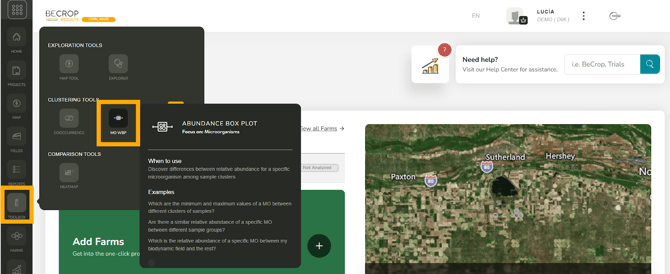
- Log into your BeCrop® Portal.
- From the left-hand menu, go to Toolbox.
- Select Abundance BoxPlot Tool.
Setting Up Clusters
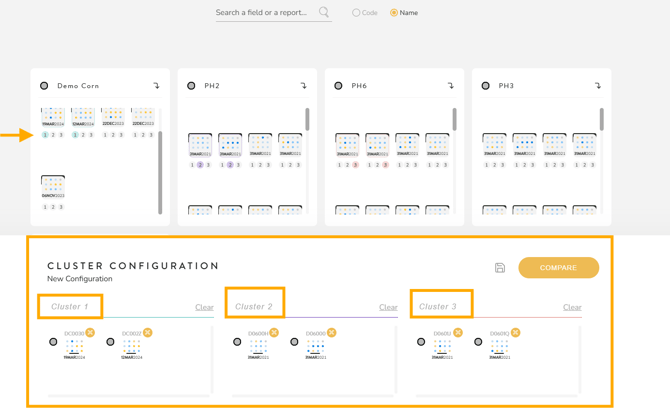
The tool compares microorganisms across clusters of samples.
- Select samples: Click the small circle below each sample to assign it to a cluster.
- Example: Assign control samples to Cluster 1 and treated samples to Cluster 2.
- Example: Assign control samples to Cluster 1 and treated samples to Cluster 2.
- Name clusters: Give each cluster a clear label (e.g., “Control untreated” vs. “Product treated”).
- Switch to name view (optional): Display sample names instead of codes for clarity.
- Save configurations: Use the disk icon to save your cluster setup.
- Load saved configurations later via Load Saved Configurations.
Running a Comparison
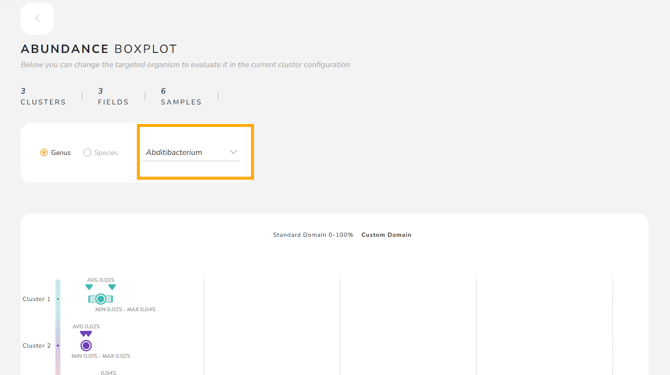
1. After assigning samples, click Compare.
-
- Search by genus (e.g., Bacillus) to display all species within that group.
Understanding Results
The chart helps you compare clusters using:
- Average relative abundance
- Minimum and maximum values (visible when hovering)
- A clearer view as you add more samples to each cluster
Example Use Case
You are trialing a biological product and want to see whether Trichoderma increased:
- Cluster 1: Control (untreated) samples
- Cluster 2: Treated samples
You can quickly see whether treated samples show higher Trichoderma abundance than the control group.
When to Use This Tool
Use Abundance BoxPlot when you want to:
- Focus on one microorganism
- Compare groups of samples (plots, treatments, time periods)
- Monitor changes in microbial abundance over time